Website migration to WordPress
Move Your Website to WordPress
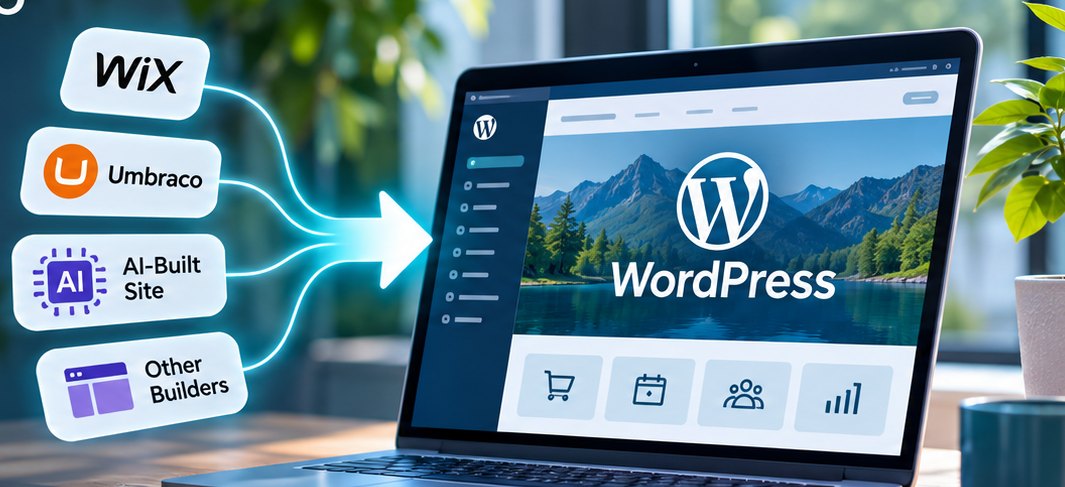
Your current website may have started on Wix, an AI website builder, Umbraco or another platform that worked well at the time.
As your business grows, however, you may need more control, better integrations, easier management or functionality that the original platform was never designed to provide.
LoganWeb can rebuild and migrate your existing website onto WordPress while retaining valuable content, branding and search visibility wherever practical.
Why migrate
A better platform, without starting from scratch.
A website migration to WordPress keeps what already works on your current site and gives it a more flexible foundation.
Greater control
More freedom over hosting, functionality and future development.
Keep your content
Retain useful pages, images, articles, products and other content wherever practical.
Protect your SEO
Plan redirects, URLs and metadata before the migration takes place.
Easy to manage
WordPress provides an established content management system for everyday updates.
Ready to grow
Add shops, bookings, CRM integrations, customer portals and other functionality later.
Ongoing support
LoganWeb can host, maintain and continue developing the site after launch.
Signs it is time
Is Your Current Website Starting to Hold You Back?
A website does not have to be broken before the platform underneath it becomes a limitation. Often the site still looks fine, but every change is slow, expensive or simply not possible.
These are the most common reasons businesses ask us to move their website to WordPress.
- The website is difficult to update.
- The original developer is no longer available.
- The current platform limits functionality.
- New development has become expensive.
- The business needs CRM integration.
- The website needs an online shop.
- Booking functionality is required.
- Customers need secure account areas or portals.
- The website performs poorly on mobile.
- The CMS is old or difficult to maintain.
- An AI-generated website was useful initially but has become too limited.
- You want a redesign without unnecessarily losing existing Google visibility.
- You want greater control over your website and hosting.
Platforms
What Websites Can We Convert to WordPress?
Every platform is different. Some allow structured content to be exported or accessed through an API. Others require the website to be professionally rebuilt in WordPress. We assess your current website first and recommend the most practical migration approach.
WixWordPress
Rebuilt in WordPress, with your content, images and SEO details carried across.
UmbracoWordPress
Content moved from your Umbraco version, with custom features rebuilt where needed.
SquarespaceWordPress
Pages, blog posts and images exported or recreated in WordPress.
GoDaddyWordPress
Website Builder sites rebuilt in WordPress with your existing content and structure.
WebflowWordPress
Design and CMS collections recreated, using WordPress post types where needed.
JoomlaWordPress
Articles, categories and media migrated with established tools where possible.
AI website builderWordPress
Recreated properly in WordPress so it is easier to extend and maintain.
Legacy CMSWordPress
Content extracted from the old system and structured cleanly in WordPress.
Static HTMLWordPress
Fixed pages turned into editable WordPress pages and templates.
Bespoke websiteWordPress
Functionality reviewed and rebuilt with WordPress and custom development.
Moving from a website builder
Proprietary website builders such as Wix, Squarespace and GoDaddy are convenient to start with, but they can restrict:
- your choice of hosting
- how easily the site can be moved elsewhere
- development options and integrations
- access to the underlying platform
Moving from Umbraco
Umbraco is a capable open-source CMS. Businesses usually move from it for practical reasons:
- an older Umbraco implementation that is due for an upgrade
- the need for specialist .NET support
- support and development costs
- difficulty finding available developers
- a wish to standardise on WordPress
Why WordPress
Why Move Your Website to WordPress?
Greater control
Self-hosted WordPress is open-source and can be hosted with any compatible hosting provider, so you are not tied to one company.
“We want our clients to stay because of the support and service we provide, not because their website cannot leave.”
Protect the investment you have already made
A migration does not necessarily mean starting again. Where appropriate we can retain your:
- content and pages
- images and downloads
- blog posts
- products
- branding
- metadata
- important URLs
Easier content management
WordPress can be configured so everyday updates are straightforward. Alongside the build we provide:
- training
- support
- practical tutorials
- ongoing technical assistance
A cost-effective foundation
WordPress can be expanded rather than replaced every time your business needs something new. That makes it a sensible choice for businesses that expect their digital requirements to grow.
Room to grow
Your Website Can Become More Than a Website
Moving to WordPress creates a foundation you can build on. The same site that presents your business today can later take orders, bookings and payments, connect to your CRM and give customers their own secure area.
Online shop
Add WooCommerce to sell:
- products
- services
- subscriptions
- digital products
See our e-commerce website design options.
Booking system
Let customers book:
- appointments
- consultations
- services
- classes
- events
Customer portal
Give customers secure access to:
- documents
- account information
- orders
- resources
Membership website
Provide:
- protected content
- subscriptions
- member-only areas
CRM-connected website
Send website enquiries straight into your CRM and automate:
- lead capture
- follow-up
- email journeys
- customer workflows
Lead generation platform
Create:
- dedicated service landing pages
- enquiry funnels
- conversion tracking
- campaign landing pages
Custom business functionality
Where off-the-shelf solutions are not enough, we build custom functionality and integrations around the way your business works.
Not all of this needs to be built on day one. We create the right foundation first and expand the site as your business grows.
SEO-safe migration
Protecting Your SEO During a Website Migration
Changing CMS does not automatically mean losing Google visibility, but a migration needs to be planned carefully. We follow Google’s guidance on site moves and our SEO services process, so SEO is considered before the new site is built rather than after it launches.
Before the migration we review
- indexed pages
- important landing pages
- Google Search Console data, where available
- page titles and meta descriptions
- URLs and headings
- internal links
- images
- structured data
- important backlinks
- organic traffic
- the XML sitemap
During the build
Where possible, we keep valuable URLs exactly as they are.
Where URLs need to change, we map each old address to its new one and set up permanent 301 redirects, so visitors and search engines land in the right place.
After launch we
- test redirects
- check for broken links
- update and submit the XML sitemap
- monitor Google Search Console
- check indexing
- watch important landing pages
No one can honestly guarantee rankings. Careful migration planning is designed to reduce unnecessary SEO disruption and protect the visibility you have already earned.
Search is changing
Built for Google, and the New Generation of AI Search
People now find businesses through traditional Google search, AI-powered search results, conversational search tools and AI assistants. There is no special “AI SEO trick”. What works is a website that is clear, useful and technically easy to understand.
Your website should clearly say
- who the business is
- what it does
- who it helps
- where it operates
- what services it provides
- why it is credible
- what visitors should do next
How we build that clarity
- clear, semantic headings
- strong service pages
- useful original content
- internal linking
- FAQs
- appropriate structured data
- crawlable content
- good performance
- clear business information
- genuine expertise
The aim is a website that is easy to understand for people, for Google and for AI search systems alike.
Our process
How We Move Your Website to WordPress
A clear, ten-step process, so you always know what is happening and your current website keeps working until the new one is ready.
01
Website audit
We review your current platform, content, SEO, functionality, integrations, hosting and future requirements.
02
Migration plan
We agree what stays, what changes, what is rebuilt and what can be migrated automatically.
03
Design and development
We build the WordPress replacement on a staging site while your existing website stays live.
04
Content migration
We transfer and check pages, articles, images, products, downloads and other relevant content.
05
Functionality and integrations
We rebuild or introduce forms, CRM connections, bookings, WooCommerce, customer portals and custom features.
06
SEO migration
We preserve important URLs and metadata where practical and create redirects where required.
07
Testing
We test on desktop, tablet and mobile, including forms, links, redirects, functionality and performance.
08
Client review
You review the new site and we make the agreed amendments.
09
Sign-off and launch
We move the new WordPress website onto your live domain.
10
Post-launch support
We monitor the site after launch and can provide ongoing hosting, maintenance and support.
Why LoganWeb
Why Choose LoganWeb for Your WordPress Migration?
We do not simply copy a website from one platform to another. We look at what your business needs now and what the website may need to become in the future.
WordPress experience
WordPress is a core part of our development and hosting work, from brochure sites to online shops.
Technical development
We do more than visual design. We develop integrations, custom functionality, business systems, APIs and CRM workflows.
WooCommerce
Existing websites can be developed into online shops, with products, payments and order management.
CRM integrations
Website enquiries and customer activity can be connected to your CRM where technically possible.
SEO-conscious migration
SEO is planned before the migration, not after the new website launches.
Managed hosting
Our website hosting includes SSL, backups, WordPress and plugin updates, security monitoring and performance monitoring.
Larger projects often suit our Advanced Website Package, while smaller brochure sites fit our Intermediate Website Package. Learn more about LoganWeb.
Case studies
Recent Website Migrations
Umbraco → WordPress
Client: [ADD CLIENT]
Challenge: [ADD CHALLENGE]
Migration: [ADD MIGRATION]
New functionality: [ADD NEW FUNCTIONALITY]
Outcome: [ADD OUTCOME]
Wix → WordPress
Client: [ADD CLIENT]
Challenge: [ADD CHALLENGE]
Migration: [ADD MIGRATION]
New capability: [ADD NEW CAPABILITY]
AI builder → WordPress
Client: [ADD CLIENT]
Original limitation: [ADD ORIGINAL LIMITATION]
WordPress solution: [ADD WORDPRESS SOLUTION]
FAQs
Website Migration to WordPress FAQs
Can you convert a Wix website to WordPress?
Yes. Wix sites cannot simply be exported as a WordPress website, so they are normally rebuilt in WordPress. Your useful content, images and page structure can usually be transferred or recreated, and we plan redirects so your existing pages keep their search visibility.
Can you convert Umbraco to WordPress?
Yes. The approach depends on your Umbraco version, content structure, database, any custom development, integrations and the access available. We review all of this first and then recommend whether content can be exported directly or needs to be rebuilt.
Can you convert an AI-built website to WordPress?
Usually, yes. It depends on the builder and the export options it offers. Where an export is limited, we recreate the site properly in WordPress so it is easier to manage and extend.
Can you migrate Squarespace to WordPress?
Yes. Squarespace can export some content, such as pages and blog posts, and we rebuild the design and anything that does not export cleanly.
Can you migrate GoDaddy Website Builder to WordPress?
Yes. GoDaddy Website Builder sites are rebuilt in WordPress, with your existing content, images and structure carried across.
Will my website look the same?
It can be recreated closely if the existing design works well for you. Alternatively, the migration can include a complete redesign.
Can you redesign my website at the same time?
Yes. Many clients use the migration as a chance to refresh the design, improve the structure and add new features in one project.
Will I lose my Google rankings?
Rankings cannot be guaranteed by anyone, but an SEO-conscious migration reduces unnecessary risk. We review your current pages and search data, keep valuable URLs where possible, set up 301 redirects where they change, and monitor Google Search Console after launch.
Can I move my WordPress website to another hosting company later?
Yes. Self-hosted WordPress can be moved between compatible hosting providers, so you are not locked in to us or anyone else.
Do I own and control my WordPress website?
WordPress itself is open-source and gives you far more platform flexibility than a proprietary builder. Some parts of a website, such as premium plugins, stock images, fonts or other licensed assets, come with their own licence terms, and we explain these for your project.
Can you add WooCommerce?
Yes. We can add a WooCommerce online shop during the migration or later, with products, payments and order management.
Can you add CRM integration?
Yes, depending on your CRM and the API or integration options it provides. We can connect enquiries and customer activity so leads go straight into your CRM.
Can you add bookings?
Yes. We can add booking for appointments, consultations, services, classes or events, or connect to a booking system you already use.
Can you migrate blog posts?
Yes, where technically possible. Blog posts are usually among the easiest content to migrate, including their images and categories.
Can you migrate products?
Yes. Products can be migrated into WooCommerce, including descriptions, images, prices and variations where the source platform allows.
Can you migrate images and downloads?
Yes, normally. Images, PDFs and other downloads are transferred and linked from the new pages.
Can you migrate forms?
Existing forms usually need to be recreated in WordPress. We rebuild them, connect them to your email or CRM and test them before launch.
Is WordPress easy to use?
WordPress is an established content management system, and we configure it so normal everyday updates are straightforward for you and your team.
Do you provide training?
Yes. Every migration includes training so you are confident making everyday updates yourself.
Do you provide tutorials?
Yes. Alongside training we provide practical tutorials and ongoing support, so help is there when you need it.
How long does a migration take?
It depends on the size of the site, its complexity and any integrations. A small brochure website is a very different project from a large Umbraco or bespoke system, so we give you a timeline once we have reviewed your site.
How much does it cost?
Cost depends on the number of pages, the current platform, the content, your design requirements, integrations, e-commerce and any custom functionality. Send us your existing website and we will assess it and give you a clear quote.
Does my website need to go offline?
Normally, no. The replacement site is developed separately and switched over only after you approve it.
Can you handle the domain and DNS?
Yes. We manage the domain and DNS changes needed to switch the new website live.
Will my email keep working?
We review your DNS and email services during the migration so the website changes do not unnecessarily interrupt your existing email.
Do you provide hosting afterwards?
Yes. Our managed WordPress hosting includes SSL, daily backups, updates and security monitoring.
Can LoganWeb maintain the website afterwards?
Yes. Our website management service covers updates, security monitoring, backups and regular reports.
Can we add more features later?
Yes. That is one of the main benefits of a flexible WordPress foundation: shops, bookings, portals and integrations can be added as your business grows.
Free migration review
Ready to Move Your Website to WordPress?
You don’t need to know exactly how your current website was built.
Send us your website address and tell us what is frustrating you about the current setup, or what you would like the site to do next. We can review your:
- current platform
- content
- SEO
- hosting
- functionality
- integrations
- future requirements